# Sitzungszimmer


# Videokonferenzen im Sitzungszimmer Mittel

<table border="1" id="bkmrk-starte-den-monitor-u" style="border-collapse: collapse; width: 100%;"><colgroup><col style="width: 50%;"></col><col style="width: 50%;"></col></colgroup><tbody><tr><td>Starte den Monitor und schliesse das **USB-C Kabel** an deinem MacBook an.</td><td>  
</td></tr><tr><td>Wähle als Quelle **HDMI 2** aus</td><td>[![IMG_2459.jpeg](https://manual.ssmarchitekten.ch/uploads/images/gallery/2025-11/scaled-1680-/img-2459.jpeg)](https://manual.ssmarchitekten.ch/uploads/images/gallery/2025-11/img-2459.jpeg)

</td></tr><tr><td>  
</td><td></td></tr><tr><td>**Bildschirmsynchronisierung** am MacBook</td><td>[![Bildschirmfoto 2025-11-07 um 11.18.08.png](https://manual.ssmarchitekten.ch/uploads/images/gallery/2025-11/scaled-1680-/bildschirmfoto-2025-11-07-um-11-18-08.png)](https://manual.ssmarchitekten.ch/uploads/images/gallery/2025-11/bildschirmfoto-2025-11-07-um-11-18-08.png)

</td></tr><tr><td>**Teams-Einstellungen** "Audio"</td><td>[![Bildschirmfoto 2025-11-07 um 11.18.28.png](https://manual.ssmarchitekten.ch/uploads/images/gallery/2025-11/scaled-1680-/X89bildschirmfoto-2025-11-07-um-11-18-28.png)](https://manual.ssmarchitekten.ch/uploads/images/gallery/2025-11/X89bildschirmfoto-2025-11-07-um-11-18-28.png)

</td></tr><tr><td>**Teams-Einstellungen** "Kamera"</td><td>[![Bildschirmfoto 2025-11-07 um 11.18.31.png](https://manual.ssmarchitekten.ch/uploads/images/gallery/2025-11/scaled-1680-/bildschirmfoto-2025-11-07-um-11-18-31.png)](https://manual.ssmarchitekten.ch/uploads/images/gallery/2025-11/bildschirmfoto-2025-11-07-um-11-18-31.png)</td></tr><tr><td>Die **Lautstärke** regelst du direkt am MacBook</td><td>  
</td></tr></tbody></table>

# Videokonferenzen im Sitzungszimmer Gross

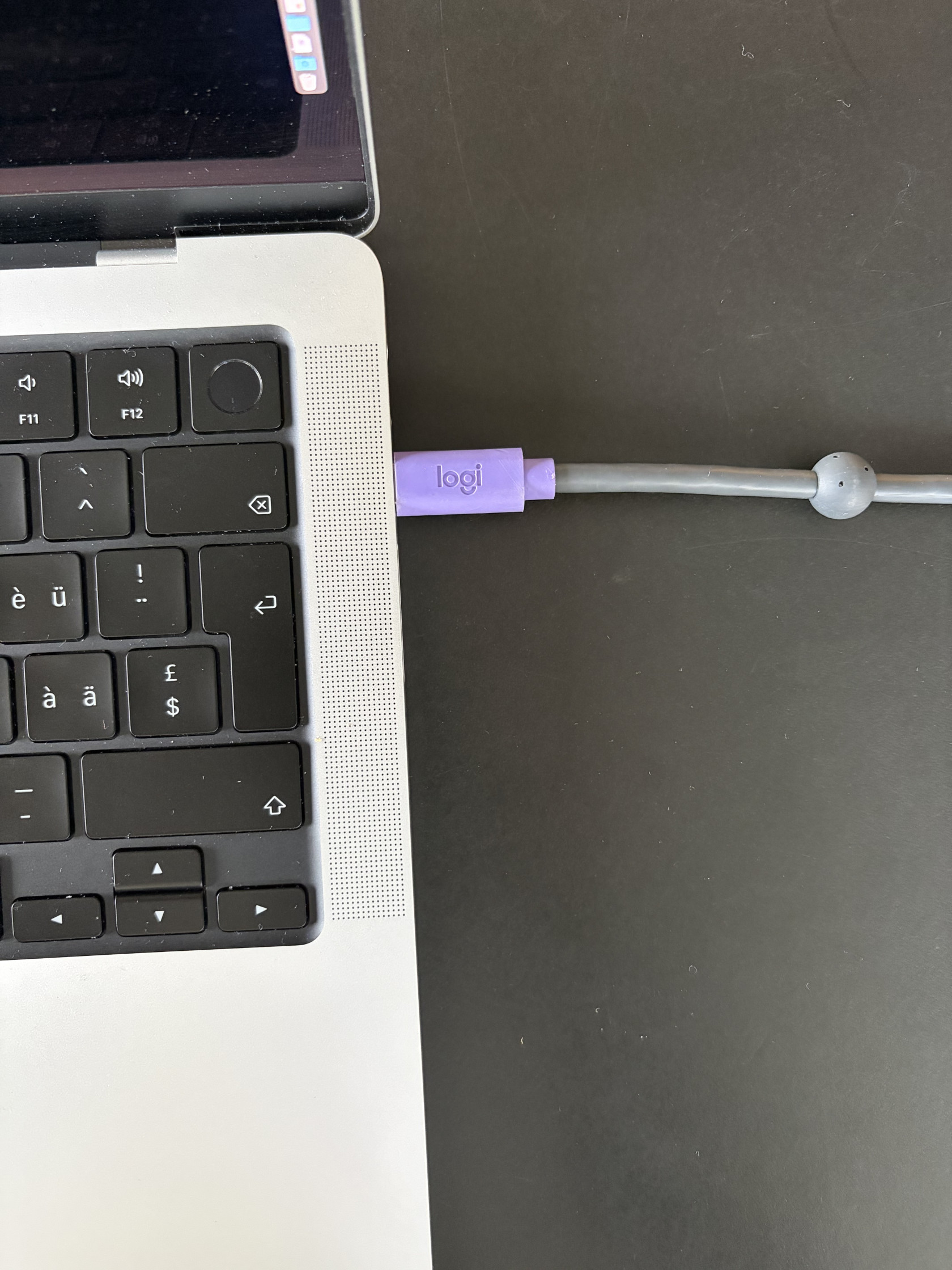
<table border="1" id="bkmrk-schliessen-dein-macb" style="border-collapse: collapse; width: 100%; height: 4252.32px;"><colgroup><col style="width: 50%;"></col><col style="width: 50%;"></col></colgroup><tbody><tr style="height: 535.367px;"><td style="height: 535.367px;">Schliessen dein MacBook über USB-C an.</td><td style="height: 535.367px;">[![IMG_2466.jpeg](https://manual.ssmarchitekten.ch/uploads/images/gallery/2025-11/scaled-1680-/img-2466.jpeg)](https://manual.ssmarchitekten.ch/uploads/images/gallery/2025-11/img-2466.jpeg)

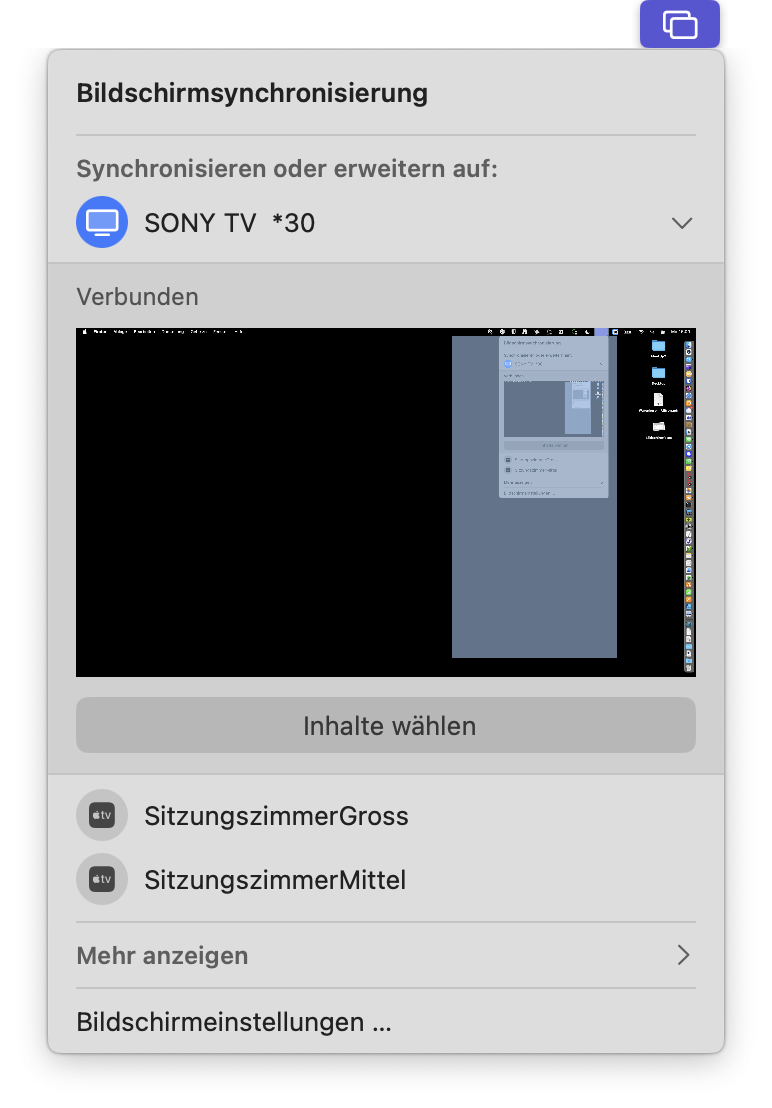
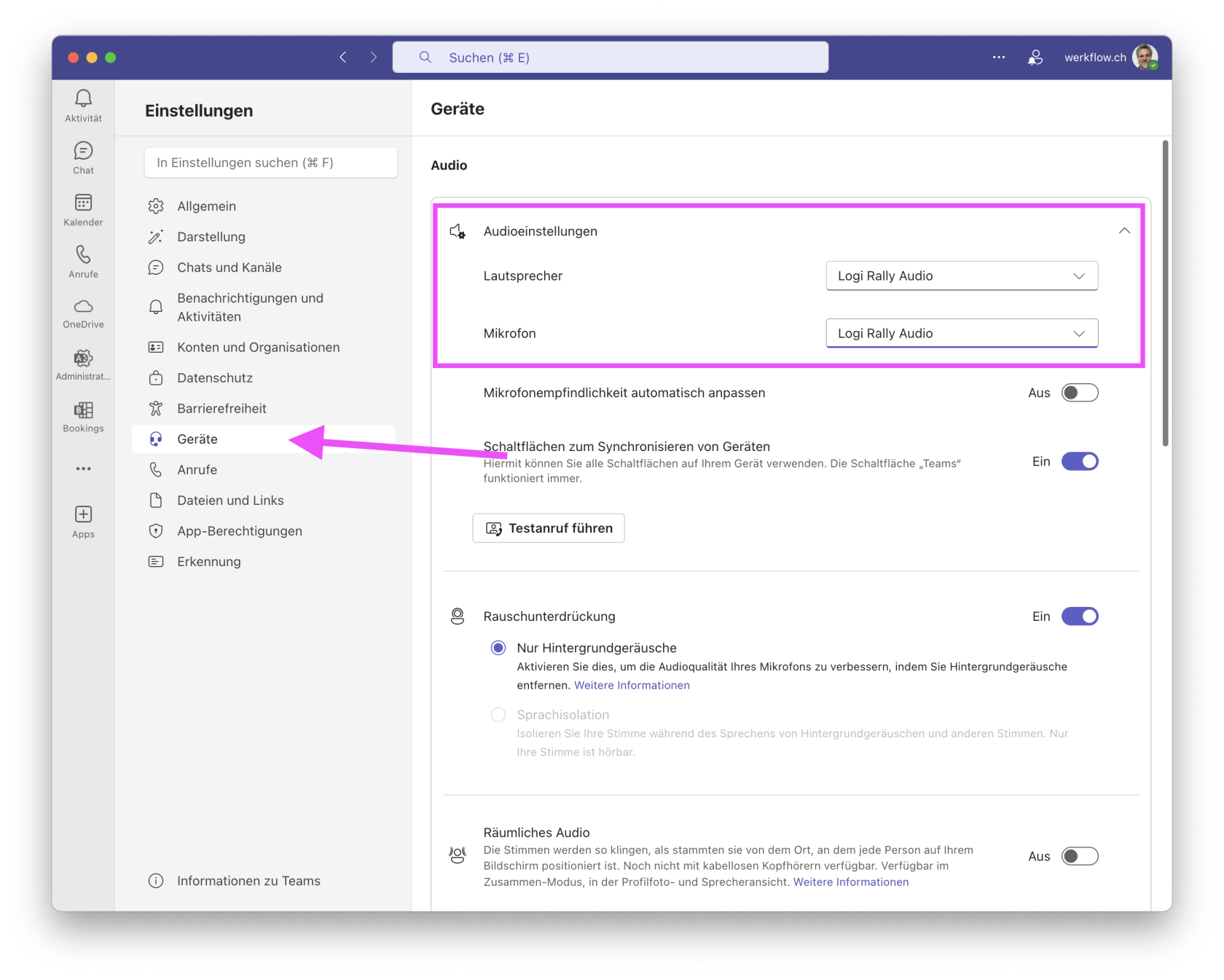
</td></tr><tr style="height: 574.85px;"><td style="height: 574.85px;">Wähle SONY TV \*30 in der Bildschirmsynchronisierung aus. </td><td style="height: 574.85px;">[![Bildschirmfoto 2025-11-10 um 16.00.06.png](https://manual.ssmarchitekten.ch/uploads/images/gallery/2025-11/scaled-1680-/bildschirmfoto-2025-11-10-um-16-00-06.png)](https://manual.ssmarchitekten.ch/uploads/images/gallery/2025-11/bildschirmfoto-2025-11-10-um-16-00-06.png)</td></tr><tr style="height: 328.917px;"><td style="height: 328.917px;">In Teams wählst du **Logi Rally Audio** für Lautsprecher und Mikrofon aus

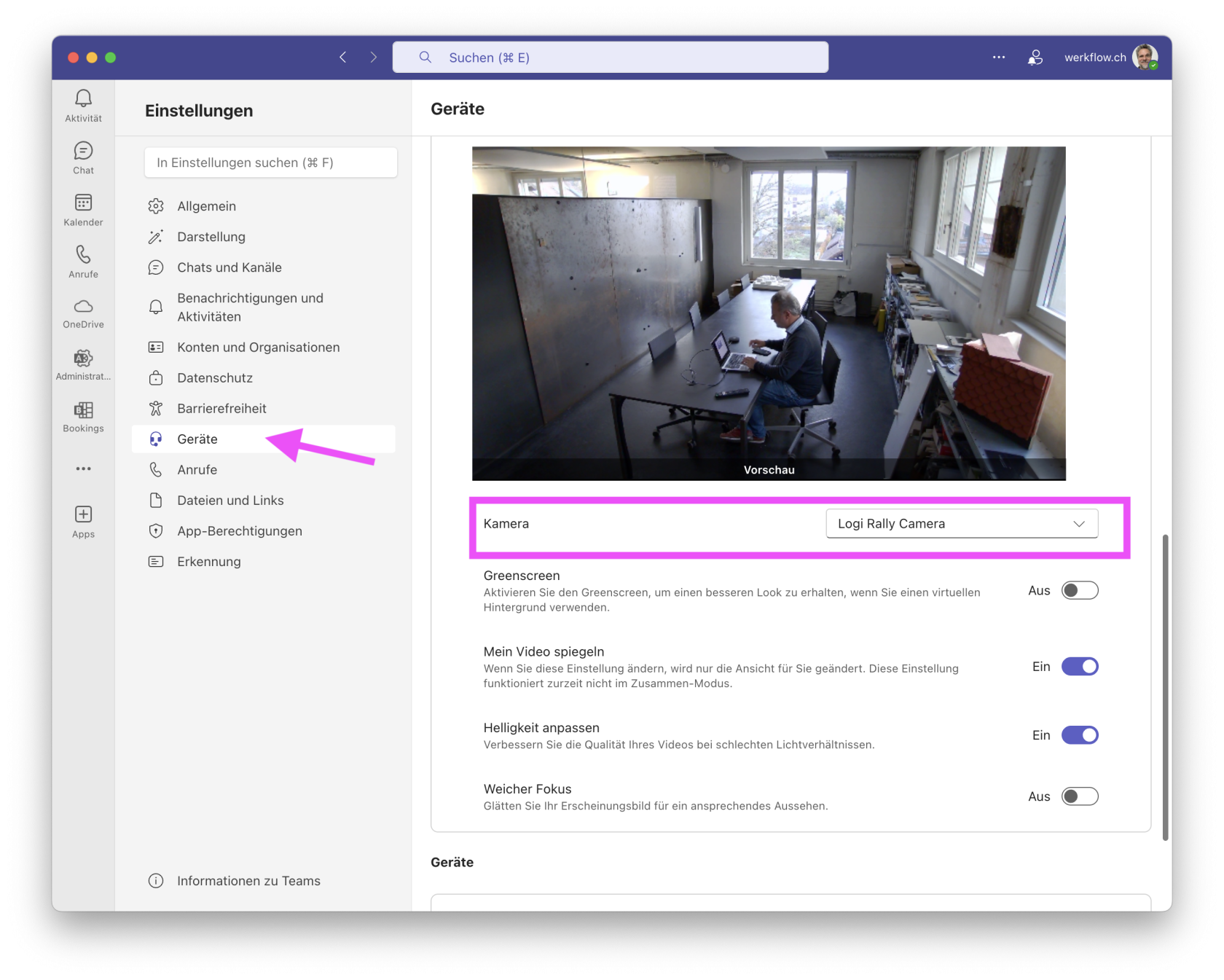
</td><td style="height: 328.917px;">[![Bildschirmfoto 2025-11-10 um 16.00.38.png](https://manual.ssmarchitekten.ch/uploads/images/gallery/2025-11/scaled-1680-/bildschirmfoto-2025-11-10-um-16-00-38.png)](https://manual.ssmarchitekten.ch/uploads/images/gallery/2025-11/bildschirmfoto-2025-11-10-um-16-00-38.png)</td></tr><tr style="height: 328.917px;"><td style="height: 328.917px;">Wähle als Kamera die **Logitech Rally Camera** aus</td><td style="height: 328.917px;">[![Bildschirmfoto 2025-11-10 um 16.00.57.png](https://manual.ssmarchitekten.ch/uploads/images/gallery/2025-11/scaled-1680-/bildschirmfoto-2025-11-10-um-16-00-57.png)](https://manual.ssmarchitekten.ch/uploads/images/gallery/2025-11/bildschirmfoto-2025-11-10-um-16-00-57.png)

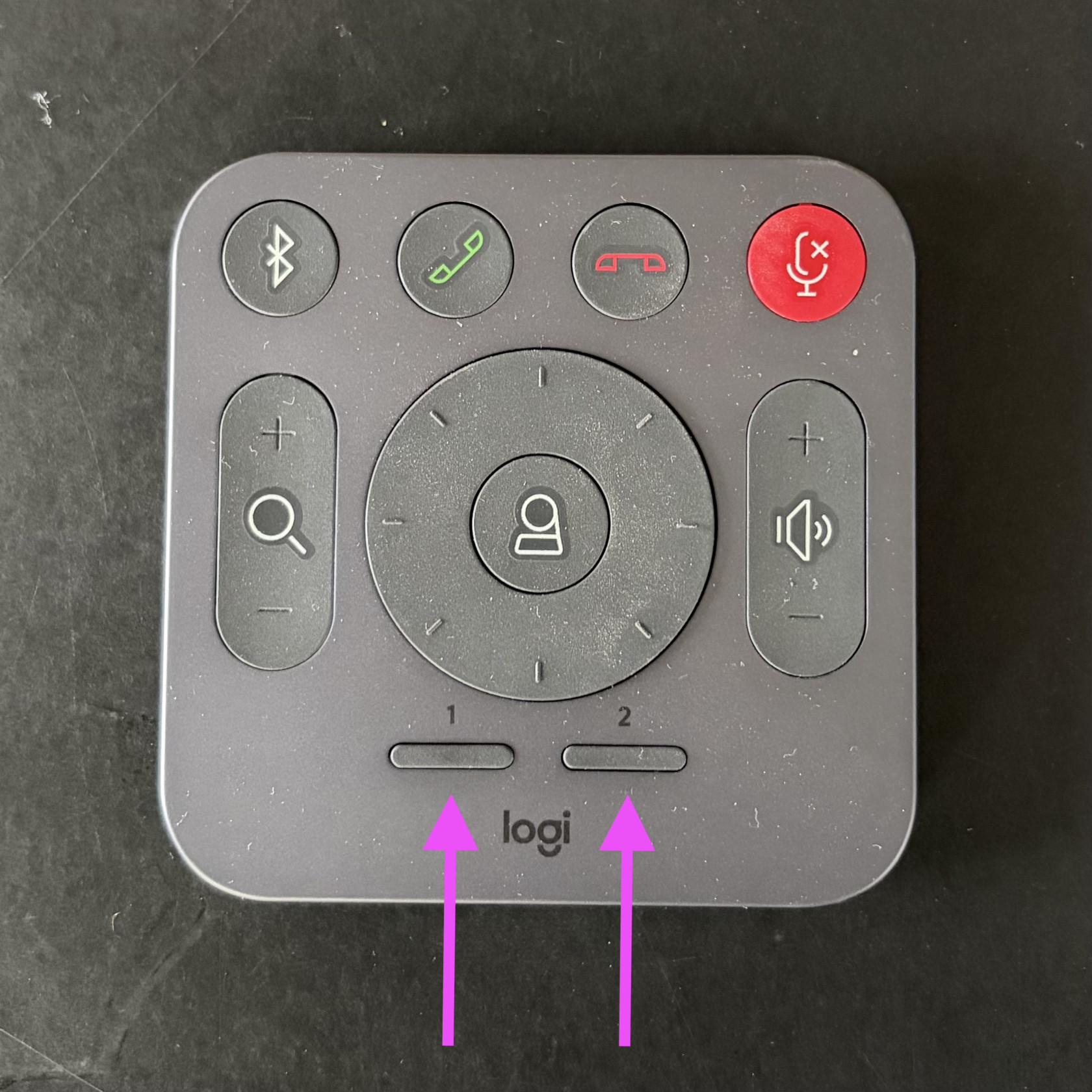
</td></tr><tr style="height: 406.2px;"><td style="height: 406.2px;">Auf der Fernbedienung sind zwei Einstellungen der Kamera gesichert, die du mit der **Taste 1** oder **2** abrufen kannst.

Den **Zoom** kannst du manuell über die **Lupe** bedienen.

</td><td style="height: 406.2px;">[![IMG_2471 Kopie.jpeg](https://manual.ssmarchitekten.ch/uploads/images/gallery/2025-11/scaled-1680-/img-2471-kopie.jpeg)](https://manual.ssmarchitekten.ch/uploads/images/gallery/2025-11/img-2471-kopie.jpeg)

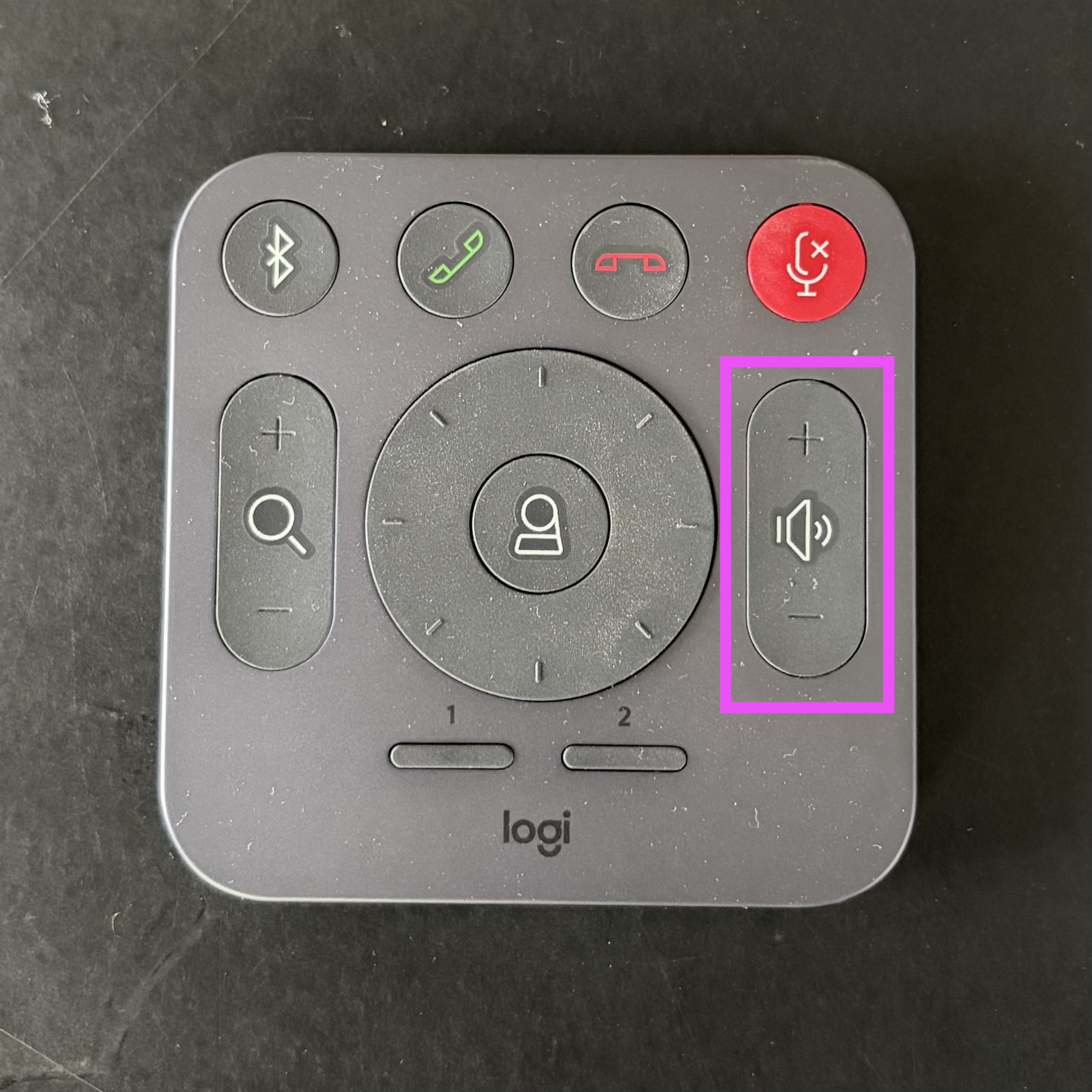
</td></tr><tr style="height: 406.2px;"><td style="height: 406.2px;">Den **Ton** regelst du über die Lautstärke-Knöpfe auf der **Fernbedienung**.  
*Die Mac-Lautstärke-Regler funktionieren bei diesem Setup nicht.*</td><td style="height: 406.2px;">[![IMG_2471.jpeg](https://manual.ssmarchitekten.ch/uploads/images/gallery/2025-11/scaled-1680-/img-2471.jpeg)](https://manual.ssmarchitekten.ch/uploads/images/gallery/2025-11/img-2471.jpeg)

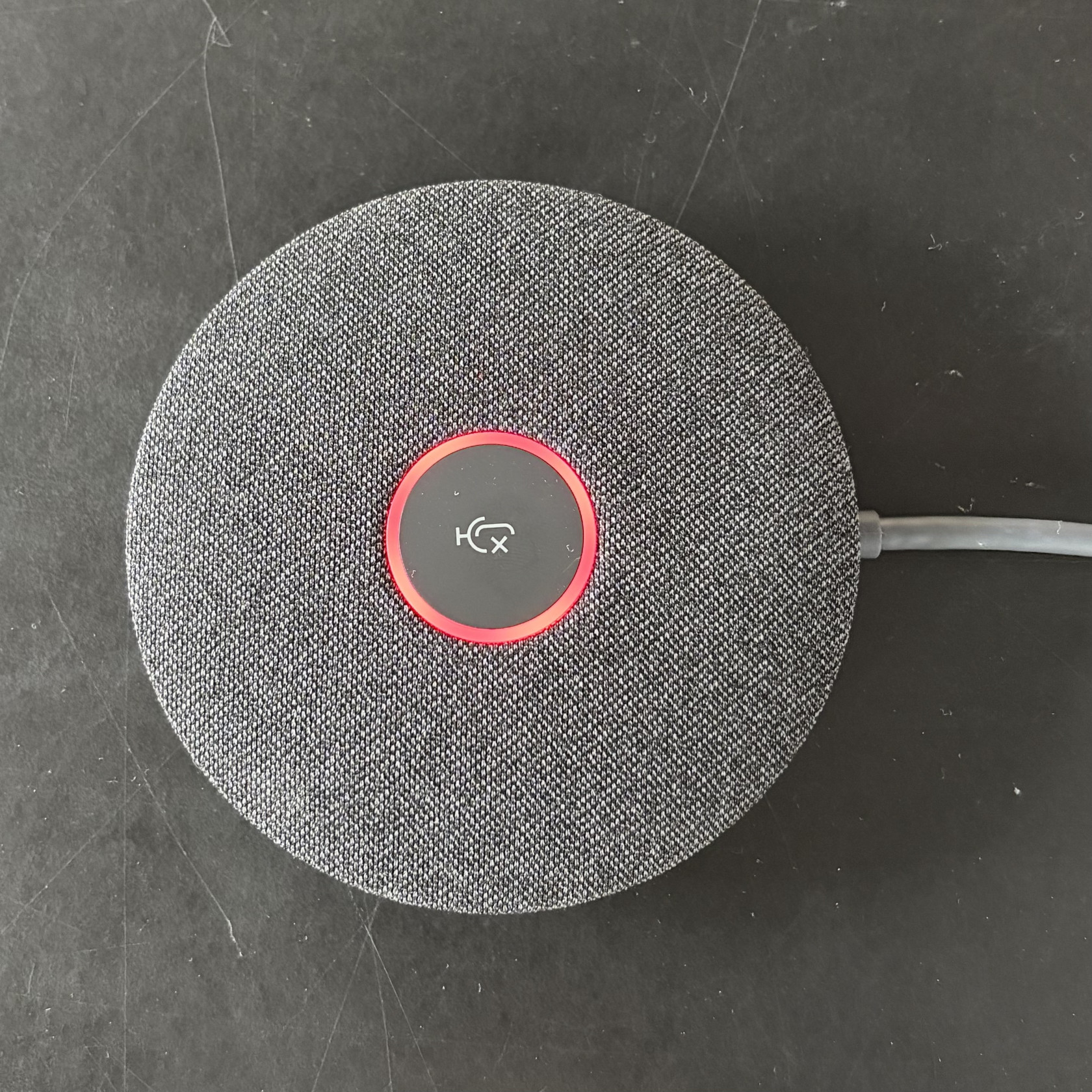
</td></tr><tr style="height: 406.2px;"><td style="height: 406.2px;">Das Mikrofon schaltest du mit einem Tip auf den Button in der Mitte ein und aus. Rot = aus.</td><td style="height: 406.2px;">[![IMG_2470.jpeg](https://manual.ssmarchitekten.ch/uploads/images/gallery/2025-11/scaled-1680-/img-2470.jpeg)](https://manual.ssmarchitekten.ch/uploads/images/gallery/2025-11/img-2470.jpeg)

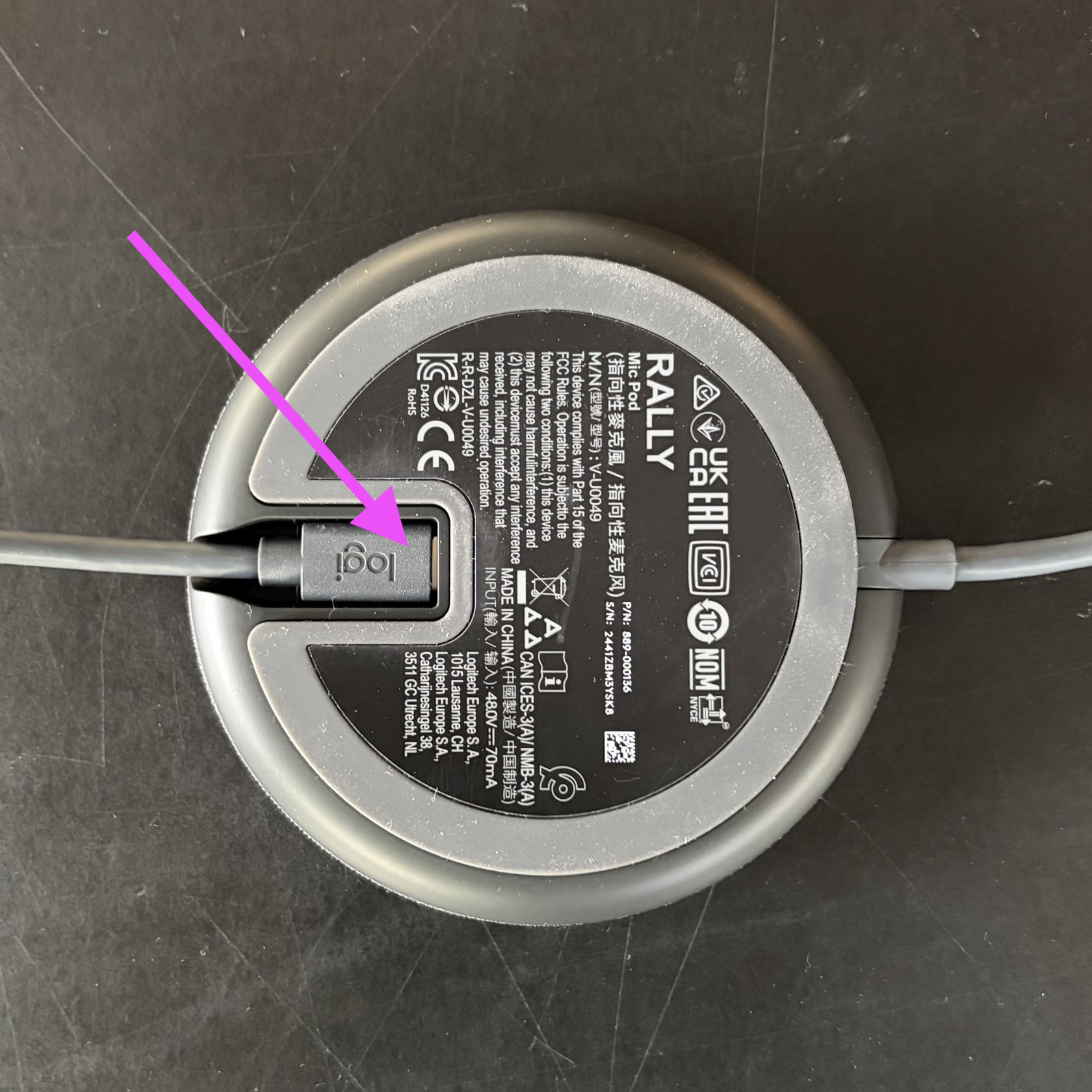
</td></tr><tr style="height: 406.2px;"><td style="height: 406.2px;">Du kannst ein weiteres Mikrofon anschliessen, um die Sprachverständlichkeit bei grossen Meetings zu verbessern. </td><td style="height: 406.2px;">[![IMG_2473.jpeg](https://manual.ssmarchitekten.ch/uploads/images/gallery/2025-11/scaled-1680-/img-2473.jpeg)](https://manual.ssmarchitekten.ch/uploads/images/gallery/2025-11/img-2473.jpeg)</td></tr></tbody></table>